Property inventory
Organize your property listings with photos
The short answer: a property inventory app should let you capture a complete listing — photos, price, specs, map pin, status — in under a minute, then find it again in seconds. Property Agenda does exactly that on iPhone and iPad, offline, with statuses and filters that keep your inventory honest.
A messy inventory kills credibility in small, expensive ways: quoting last month's price, pitching a house that went under contract last week, scrolling your camera roll for five minutes while the client watches, sending "the one with the garden — I think it was on Calle 12?" The inventory in your head served you fine at ten properties. Past that, the difference between an agent who looks sharp and one who looks scattered is usually just where the listings live. And because Property Agenda works offline, the capture happens at the property itself, standing in the kitchen — not from memory at your desk that evening.
What every listing should carry
- A photo gallery — the property's own photos, in the property's own record, not lost in 4,000 camera-roll shots.
- Price or monthly rent — with the operation (sale or rent) and type: house, apartment, land, office or retail.
- The specs buyers ask first — bedrooms, bathrooms, built m², parking and floors.
- Address and map pin — with one-tap directions handed off to Apple Maps, Google Maps or Waze.
- A live status — Available, Reserved or Sold, changed the moment reality changes.
- Feature tags — pool, garden, terrace, roof garden, 24-hour security, storage, plus your own custom tags.
Capturing a listing in Property Agenda, step by step
- Photos first. Add the gallery straight from your library — the shots are half the pitch.
- Fill the numbers. Price or rent, beds, baths, m², parking, floors — the fields are quick pickers, not essay boxes.
- Drop the map pin. Later, one tap hands the address to Apple Maps, Google Maps or Waze — for you on showing day, or for a client driving themselves.
- Tag the features and the area. Tags are what make the listing findable when a client asks for "something with a terrace in the north."
- Set the status — and keep it honest. Flip Available to Reserved the day the deposit lands, and Sold the day it closes. Ten seconds of discipline that saves you from ever pitching a sold house.
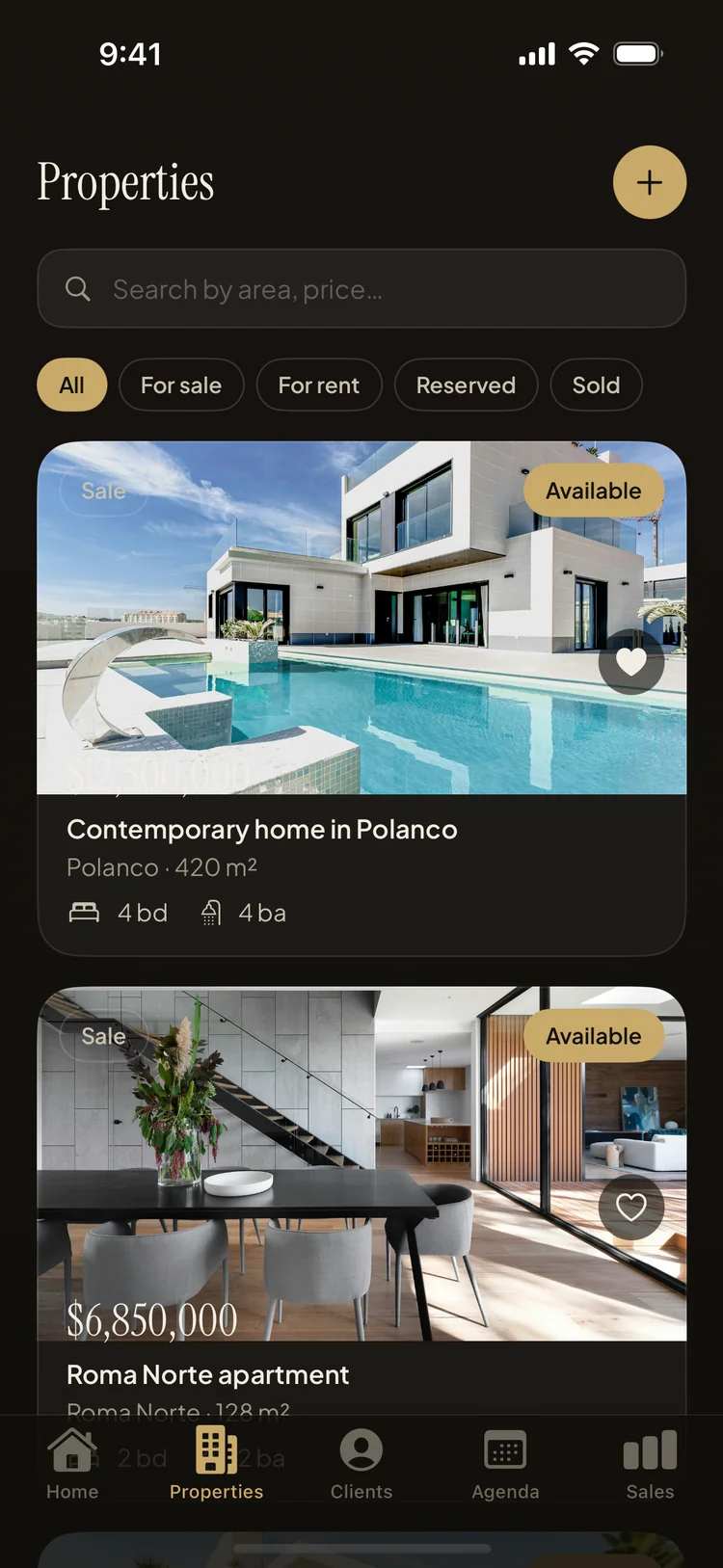
Finding it again is the whole point
Capture is only half of organization; retrieval is the payoff. Search your inventory by area or price, narrow with the filter chips — All, For sale, For rent, Reserved, Sold — and mark hot listings as favorites so this month's priorities float to the top. When a client calls asking what you have under a certain figure in a certain zone, the answer is two taps, spoken while they're still on the line. And once a listing is saved, it's ready to become a professional PDF fact sheet in one tap.
The map pin deserves special mention, because addresses are where showings go wrong. "The white house past the second roundabout" is not an address, and the client who typed their own version into a maps app is now in the wrong cul-de-sac. With the pin saved once, directions become a handoff — you pick Apple Maps, Google Maps or Waze at tap time — and everyone arrives at the same door.
Start free, grow when it's earned
The free plan holds 5 properties — enough to move your active inventory in tonight and feel the difference tomorrow. Moving in is fast precisely because capture is fast: five listings is a quarter of an hour, most of it spent choosing photos. Pro removes the cap when your portfolio grows, and nothing you've saved is ever locked behind the paywall.
An inventory that makes you look sharp
Property Agenda is free on the App Store. No account, no login, works offline.
Download Property Agenda